


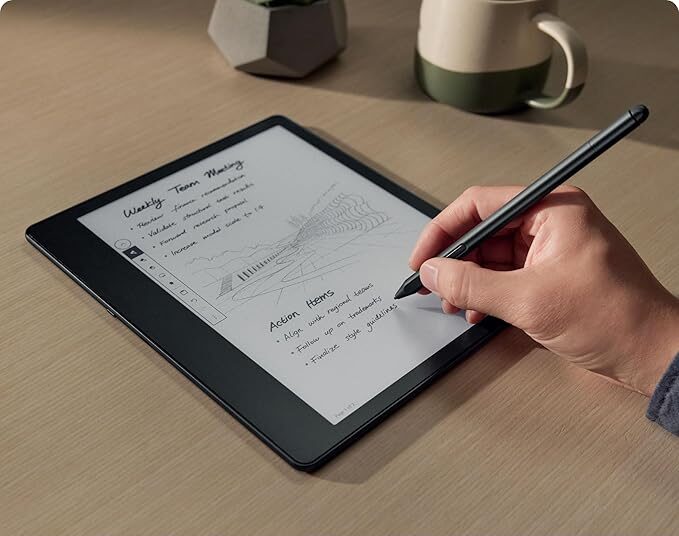
Well, you can’t get more straightforward than that title. The Kindle Scribe experience is everything you’d expect from an Amazon e-reader, and then some. With its 10-inch display, slightly smaller than the 5th-generation Apple iPad Air, the Scribe takes Kindle reading to the next level, combining e-Ink screen quality with the feel of a tablet. For anyone noticing the signs of aging eyes and struggling with smaller text, this device feels like a blessing.
But, like everything in life, accessing this type of product comes with a higher price to pay. The Amazon Kindle Scribe has four price variations:
- Amazon Kindle Scribe 16GB – $429.99 (Basic Pen)*
- Amazon Kindle Scribe 16GB – $459.99 (Premium Pen)*
- Amazon Kindle Scribe With Redesign Display 16GB – $499.99
- Amazon Kindle Scribe With Redesign Display 32GB – $529.99
- Amazon Kindle Scribe With Redesign Display 64GB – $569.99
*This model also comes with 32GB and 64GB of storage, but we couldn’t find the suggested price
All models include the Premium Pen, a high-quality stylus designed for use with this e-reader. But as you may have noticed, the Scribe’s price is basically double that of the Kindle Colorsoft model (if you only look at the 16GB version), which is already more expensive than the Kindle Paperwhite. So, if the Colorsoft’s price is already something to consider, the Scribe’s price even more so. Even in the U.S. and Canada.
Do the strengths outweigh the price?


So, I felt that in the case of the Scribe, these factors really matter. Amazon’s e-reader, with its 10-inch screen combined with what the pen and the note-taking features (not only in the provided notebooks but also in books) can offer, makes the price of the largest Kindle on the market feel much lighter, especially if you choose the 16GB model without the redesigned display.
Is it too big and uncomfortable?
I found no issues with short reading sessions or while resting on something. For longer stretches, it might be a concern. I say might because I managed almost an hour straight on a train without discomfort. After about 45 minutes, I noticed the weight, but it wasn’t unbearable. Honestly, it felt less tiring than reading on my iPad.
Handwriting
This is where things get interesting. There are two main aspects: notebooks and use within books. With laptops, it feels natural and intuitive, almost like writing on real paper. The flow is smooth, and you can even generate a table of contents once you’re done with your notes. You can also summarize the current page or the entire notebook. Out of everything I wrote, only one word wasn’t recognized by the AI. Strangely enough, when I used the “Improve Handwriting” feature, it identified the same word correctly.
That “Improve Handwriting” feature is convenient. Even with my messy scribbles, it converted everything into neat, typed text. The catch? Currently, summaries and handwriting improvements are only available in English and French.
Handwritten notes in books
Another highlight is jotting notes directly in books and PDFs. It’s way more natural than typing. Typing on the Scribe, or even the Colorsoft, is much smoother than ever on my old Paperwhite. Still, handwriting is faster and more enjoyable. You can pin highlights directly in the text or keep them as hidden notes, and revisit just your annotations later.
Hardware
If you’re a fan of the Kindle Oasis and its premium feel, you’ll love the Kindle Scribe. Its dark aluminum body and matte front display look stunning. It definitely feels like a high-end device, whether in your hands or tucked inside its case.
The lack of physical page-turn buttons could be seen as a downside, but I didn’t find it to be a big deal. It would make sense to have one, and there’s room on the left bezel for it, but I managed fine without.
I like that it has a larger bezel on one side, making it easier and more comfortable to hold, similar to the Oasis. It’s also nice to see a USB-C port for charging.
The display itself is excellent. At 300 PPI, the 10-inch screen makes reading a pleasure. The text is sharp, and not having to flip pages as often was a big deal for me. When I’m really into a book, I read quickly, and with my 2013 Paperwhite, I found myself flipping pages constantly.
Web Browser
It’s been a while since I last did a Kindle review, back in 2021, so what I’m about to say might not even be new anymore. However, on the Scribe, I noticed that there’s a web browser, just like taking a Kindle, at least. It’s a very basic browser. It warns you that simple pages will have less limited navigation, but pages with animations will struggle. It’s a nice extra, but you don’t really use a Kindle to stay connected. There used to be an option to share excerpts from the book you were reading on Twitter (now X), but that feature disappeared a long time ago. And I regret that. Anyway, the browser is just an additional feature. It’s nice to have, but it’s not essential to the device.
Conclusion
I believe the Kindle Scribe is the best Kindle I’ve ever tested. However, the price is a real issue. After all, it costs almost 200 dollars more (if you only consider the 16GB model) compared to the Kindle Colorsoft or the Kindle Paperwhite.
That said, the ability to take handwritten notes in books and notebooks is game-changing. Despite its larger size, it’s still light enough not to interfere with long reading sessions. The bigger screen is a huge plus, especially if your eyesight isn’t what it used to be.
So, it really comes down to this: if you’ve got some extra cash or, like me, are still holding on to an older Paperwhite, the Scribe might be your next Kindle. But if you’re on a budget, the Kindle Paperwhite is still a safe bet; you can’t go wrong with it.


